Imagine your computer suddenly shutting down mid-project, unsaved work gone and files corrupted. Or worse, critical medical equipment failing during a power flicker. These risks are real but entirely preventable. At the heart of reliable power protection lies the Uninterruptible Power Supply (UPS), a silent guardian that keeps devices running during outages and shields them from harmful electrical fluctuations. But how does a UPS work exactly? It acts as an intelligent power manager that ensures continuity, stability, and safety for sensitive electronics.
A UPS sits between your equipment and the wall outlet, constantly monitoring incoming power. When everything is normal, it conditions the electricity and charges its internal battery. The moment utility power fails or becomes unstable, whether from a blackout, surge, or brownout, it instantly takes over, supplying seamless power from its battery. This guide explains the different UPS types, how each one operates, and how to pick the right one for your setup.
Standby UPS: Basic Backup Protection

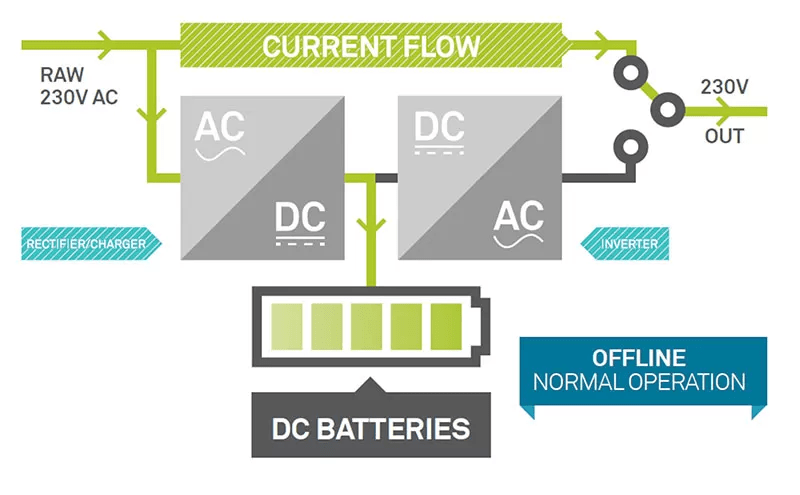
The Standby UPS (also called Offline UPS) is the simplest and most cost-effective type, designed for everyday use with non-critical devices.
How It Delivers Power
Under normal conditions, connected devices run directly on utility power. The UPS remains on standby, continuously monitoring voltage levels. Only when it detects a drop, spike, or complete outage does it switch to battery power using an internal inverter.
This transition typically takes 2–10 milliseconds, which is fast enough for most consumer electronics like desktop PCs, routers, and printers. However, this brief delay can still pose risks for highly sensitive equipment.
When to Use a Standby UPS
- Home offices with basic computing setups
- Gaming rigs where data loss from sudden shutdowns is a concern
- Small retail systems like POS terminals
Pro Tip: While affordable, avoid using Standby UPS units for servers or network switches that require clean, uninterrupted power.
Line-Interactive UPS: Smarter Voltage Control

For environments where power fluctuations are common but full-time double conversion is not needed, the Line-Interactive UPS offers a balanced solution.
Built-In Voltage Regulation
Unlike the Standby model, this UPS includes Automatic Voltage Regulation (AVR), a key feature that corrects minor voltage issues without tapping into the battery.
- During a brownout (low voltage), it boosts the voltage
- During a surge (high voltage), it reduces it
This happens seamlessly through a transformer, keeping your devices powered by utility electricity while improving its quality. Battery power only engages during full outages or severe disturbances.
Why Choose Line-Interactive
- Extends battery life by reducing unnecessary discharges
- Improves efficiency since the inverter is not always active
- Handles frequent sags and surges common in unstable grids
Common Applications
- Small business servers
- Network closets with switches and routers
- Home labs and NAS devices
Expert Note: In regions with unstable grids, a Line-Interactive UPS provides significantly better protection than a basic surge protector or Standby unit.
Online UPS: Ultimate Power Protection
For mission-critical systems where even a microsecond of downtime is unacceptable, the Online UPS (Double-Conversion UPS) is the gold standard.
Always-On Power Conversion
Here is what makes it unique: all incoming AC power is converted to DC to charge the battery, then inverted back to clean AC to power your devices, even when the grid is stable.
This means:
– Your equipment never runs directly on raw utility power
– Power is continuously filtered and regulated
– There is zero transfer time during outages because the battery is always online
Complete Electrical Isolation
Because the load is fully isolated from the input, the Online UPS eliminates all common power problems:
– Voltage sags and surges
– Frequency variations
– Electrical noise and harmonics
It also supports bypass mode, allowing utility power to flow directly to the load during maintenance or when efficiency is prioritized.
Who Needs an Online UPS
- Data centers and server farms
- Hospital life-support and imaging systems
- Industrial control systems
- Telecom infrastructure
Warning: These units generate more heat and consume more energy than other types due to constant conversion, but the trade-off is unmatched reliability.
Compare UPS Types at a Glance
| Feature | Standby UPS | Line-Interactive UPS | Online UPS |
|---|---|---|---|
| Transfer Time | 2–10 ms | 2–10 ms | 0 ms |
| Voltage Regulation | No | Yes (AVR) | Yes (continuous) |
| Power Quality | Basic | Medium | Highest |
| Battery Usage | Only during outages | Only during outages or severe sags | Always powering load |
| Efficiency | High | Medium-High | Lower (unless in bypass) |
| Cost | Low | Medium | High |
| Best For | Home users, basic electronics | SMBs, network gear | Data centers, critical systems |
Use this table to match your needs with the right protection level.
What Happens During a Power Failure?
Understanding the real-time response of a UPS helps clarify its value.
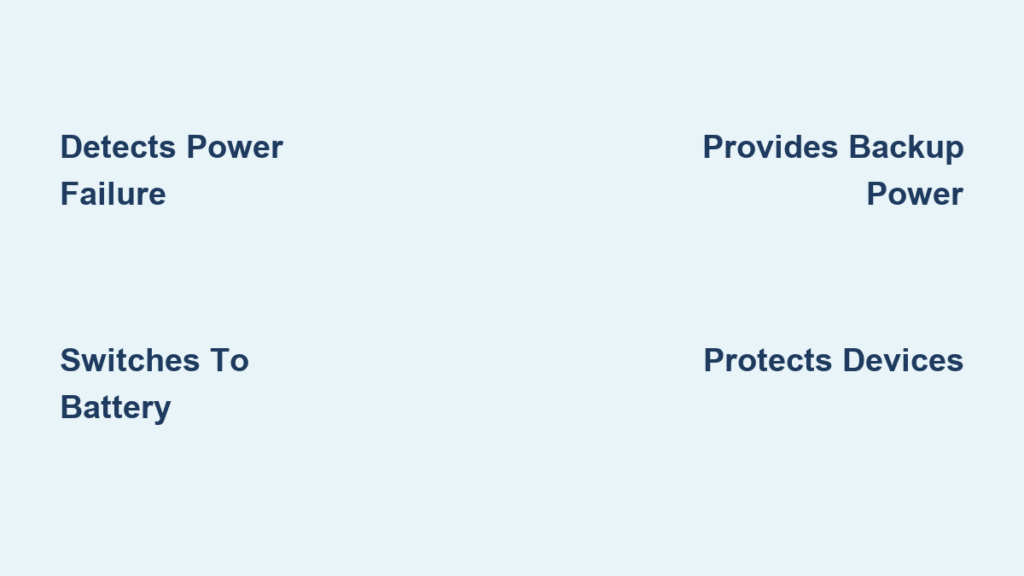
Step-by-Step Failure Response
- Detection: The UPS senses a voltage drop or complete loss of power
- Switch to Battery: Instantly engages the inverter to draw power from the battery
- Alarm Activation: Emits audible or visual alerts to notify users
- Runtime Support: Powers connected devices for minutes to hours, depending on load and battery capacity
- Graceful Shutdown: Allows time to save work or initiate automated shutdown scripts
Visual Cue: Most UPS units have LED indicators showing “Online,” “On Battery,” or “Low Battery.”
How Long Will It Last
Battery runtime depends on:
– Total wattage of connected devices
– Battery capacity (measured in VA or Wh)
– Age and health of the battery
For example:
– A 600VA UPS might power a desktop PC for 5–10 minutes
– A large Online UPS can support a server rack for 30+ minutes
Pro Tip: Use UPS management software to schedule automatic shutdowns and prevent data corruption.
Key Components Inside a UPS
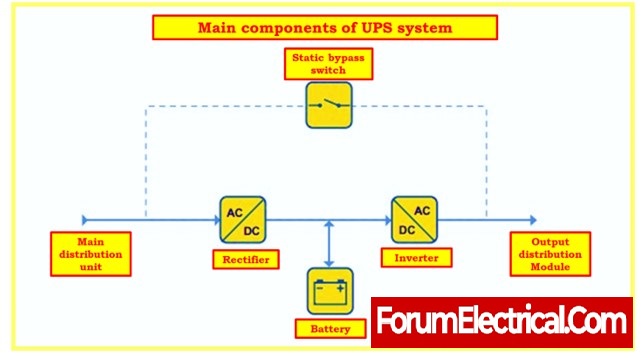
Every UPS contains core components that make its operation possible.
Battery
- Stores energy for use during outages
- Typically sealed lead-acid (VRLA) or lithium-ion in newer models
- Lifespan: 3–5 years (degrades with temperature and usage)
Inverter
- Converts DC power from the battery into AC power for your devices
- Pure sine wave output is best for sensitive electronics
Rectifier and Charger
- Converts incoming AC power to DC to charge the battery
- In Online UPS systems, this runs continuously
Static Bypass
- Allows power to flow around the UPS circuit during overload or internal failure
- Ensures continuity even if the UPS itself malfunctions
Control Circuitry
- Monitors input voltage, battery status, and load
- Manages switching, alarms, and communication with connected devices
Common UPS Features Explained
Modern UPS units come with advanced capabilities beyond basic backup.
Pure Sine Wave vs Simulated Sine Wave
- Pure Sine Wave: Output matches utility-grade power; safe for all devices, especially motors and medical equipment
- Simulated (Stepped) Sine Wave: Approximates AC power; may cause issues with laser printers or variable-speed motors
Recommendation: Always choose pure sine wave for servers, NAS, and high-end electronics.
USB and Network Monitoring
Many UPS models include ports to connect to a computer or network.
- Enables real-time monitoring of voltage, load, and battery health
- Supports automatic shutdown via software
Cold Start Capability
Allows the UPS to turn on and provide power even when utility power is off. This is useful after a blackout.
Eco Mode (for Online UPS)
Improves efficiency by switching to bypass mode when power is stable, then reverting to double-conversion if disturbances occur.
How to Choose the Right UPS
Selecting the correct UPS comes down to matching protection to your equipment’s sensitivity.
Ask These Questions
-
What devices am I protecting?
A router needs less protection than a RAID storage array. -
How long do I need runtime?
Just enough to shut down, or extended backup for generator startup? -
How stable is my power supply?
Frequent sags suggest AVR (Line-Interactive) or Online protection. -
Do I need remote monitoring?
Essential for unattended servers or data closets.
Size It Right
Calculate total wattage of connected devices, then add a 20–30% buffer.
Example:
– PC: 300W
– Monitor: 50W
– Router: 10W
Total: 360W → Choose at least a 500VA / 400W UPS
Warning: Overloading a UPS causes overheating and premature failure.
Maintenance Tips to Extend UPS Life
Even the best UPS will not last without proper care.
Regular Checks
- Test monthly: Simulate a power failure to verify battery response
- Clean vents: Dust buildup causes overheating
- Inspect for swelling or leaks: Signs of battery failure
Environmental Factors
- Keep in a cool, dry place, since heat shortens battery life
- Avoid direct sunlight and enclosed spaces
- Ideal operating temperature: 20–25°C (68–77°F)
Replace Batteries Proactively
After 3–5 years, replace the battery even if it seems functional. Degraded batteries may fail when needed most.
Pro Tip: Some models support hot-swappable batteries, which is ideal for continuous operation.
Frequently Asked Questions About UPS Systems
What Is the Main Purpose of a UPS?
A UPS provides immediate backup power during outages and protects connected devices from voltage irregularities like surges, sags, and spikes. It keeps equipment running long enough for a safe shutdown or until utility power returns.
How Fast Does a UPS Switch to Battery Power?
Transfer speed depends on the UPS type. Standby and Line-Interactive UPS units switch within 2–10 milliseconds. Online UPS units have zero transfer time because the battery continuously powers the load.
Can a UPS Protect Against Lightning Strikes?
A UPS offers some protection against small surges, but a direct lightning strike requires a dedicated surge protector or lightning arrestor. For best results, use a UPS alongside a whole-building surge protection system.
How Long Do UPS Batteries Last?
Most UPS batteries last 3–5 years, depending on usage, temperature, and maintenance. Hot environments and frequent discharges shorten this lifespan.
Do I Need a UPS for My Home Computer?
Yes, if you want to protect your work and hardware from sudden shutdowns, surges, or data corruption. A basic Standby UPS is usually enough for a home PC setup.
What Size UPS Do I Need?
Add up the wattage of all devices you plan to connect, then add a 20–30% buffer. Choose a UPS rated for at least that total wattage to ensure reliable performance.
Key Takeaways on How a UPS Works
So, how does a UPS work? At its core, it acts as a smart bridge between your devices and the unpredictable power grid. Whether it is a basic Standby unit keeping your home PC safe or a full Online system protecting a hospital’s ICU, the principle remains the same: detect trouble, respond instantly, and keep power flowing.
The key is choosing the right type:
– Standby UPS: Affordable, simple, great for home use
– Line-Interactive UPS: Balanced protection with AVR, perfect for small businesses
– Online UPS: Maximum reliability for critical infrastructure
Pair the correct topology with proper sizing and regular maintenance, and your UPS will deliver years of silent, dependable service. Start by auditing your equipment, calculating your total wattage, and matching your protection level to the value of what you are safeguarding.