A sudden power outage can cost you hours of unsaved work, corrupt important files, or even damage your hardware. When the lights flicker and your desktop suddenly goes dark, there’s no time to react. That’s where a UPS power supply becomes essential. A UPS (Uninterruptible Power Supply) is a battery backup device that keeps your electronics running during outages and shields them from harmful voltage fluctuations.
In this guide, you’ll learn exactly how a UPS works, how to pick the right size for your setup, and how to calculate how long it will power your devices. You’ll also discover why a UPS is far more capable than a basic surge protector and where it makes the biggest difference in your daily routine.
How a UPS Powers Your Devices During an Outage
A UPS sits between your devices and the wall outlet, silently watching the incoming power at all times. The moment it detects a problem, it switches to its internal battery so fast that your devices never register a disruption. This seamless failover is what separates a UPS from a simple surge strip.
Instant Battery Switchover
The defining feature of any UPS power supply is its ability to deliver backup power the instant the grid fails. An internal inverter converts the DC power stored in the battery into AC power your devices can use. This automatic switch kicks in for:
- Complete blackouts
- Voltage sags (brownouts)
- Sudden voltage spikes
Because the switch happens in milliseconds, your computer, router, or server keeps running without rebooting.
Three Main Types of UPS Systems
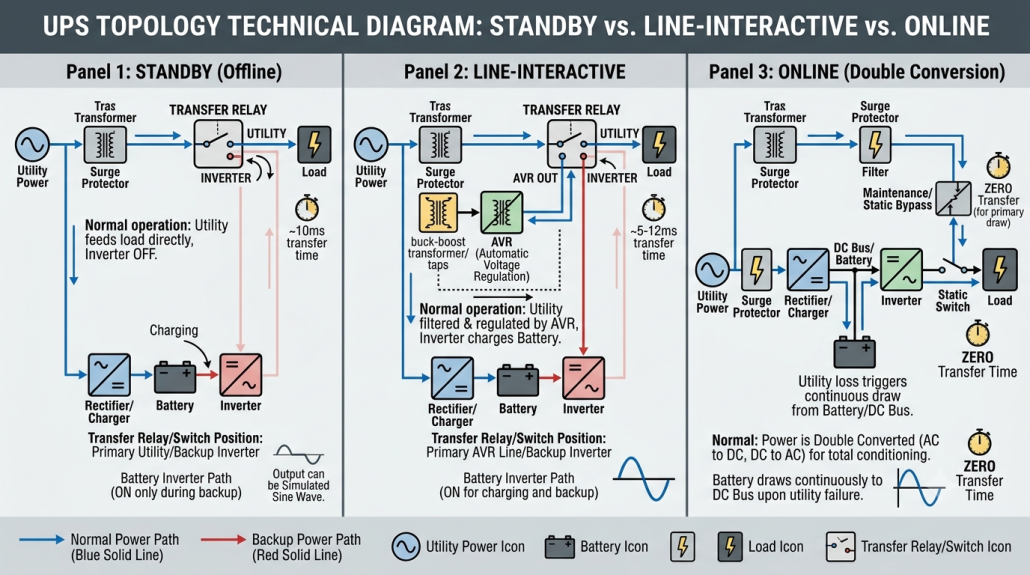
UPS units come in three designs, each offering different levels of protection and price points.
Standby (Offline) UPS
- Switches to battery only when power fails
- Most affordable option for home users
- Great for personal computers and routers
Line-Interactive UPS
- Adjusts voltage continuously without draining the battery
- Handles brownouts and overvoltages more effectively
- Ideal for areas with unstable power
Online (Double-Conversion) UPS
- Powers devices from the battery at all times
- Delivers the cleanest, most stable electricity
- Common in data centers and medical facilities
For most home offices and small businesses, a line-interactive UPS strikes the best balance between cost and protection.
Choosing the Right UPS Size for Your Setup
Picking the right UPS means matching its capacity to what you plan to plug in. Go too small and it can’t support your gear. Go too large and you waste money on power you don’t need. The key spec to understand is the VA (volt-ampere) rating.
Match the VA Rating to Your Device Load
The VA rating tells you the maximum load a UPS can handle. Most consumer models fall between 450VA and 1500VA. Here’s a quick guide:
- 450–650VA: Supports a desktop PC, monitor, and router
- 800–1000VA: Handles gaming rigs or small workstations
- 1000–1500VA: Powers multiple devices or home servers
Always add up the power draw of everything you plan to connect before choosing.
Avoid Undersizing or Oversizing Your UPS
- Undersized UPS: Overloads, shuts down unexpectedly, or fails to keep devices alive
- Oversized UPS: Costs more upfront and runs less efficiently with light loads
Pro Tip: Aim to use about 60–80% of the UPS’s rated capacity. This sweet spot gives you the best runtime and efficiency.
How to Calculate UPS Runtime for Your Devices

Runtime is the amount of time a UPS can keep your devices powered during an outage. It depends on two things: the battery capacity of the UPS and the total wattage of everything plugged into it.
Estimate Runtime in Minutes
A simple formula gives you a reliable estimate:
Runtime (minutes) ≈ (UPS VA Rating) ÷ (Total Device Wattage) × 60
Before plugging in the numbers, you need to know each device’s wattage.
Find Your Device’s Wattage
-
Check the power adapter label. Look for output voltage (V) and current (A).
Multiply them together: Watts = Volts × Amps
Example: A charger labeled 19V, 3.42A draws 19 × 3.42 = 65W -
Look up the manufacturer’s specs online if the label is missing or unclear.
Once you have the total wattage, divide your UPS’s VA rating by that number to estimate runtime.
Real-World Runtime Examples
| Device | Power Draw | 1000VA UPS Runtime |
|---|---|---|
| Laptop | 20W | ~50 minutes |
| Desktop PC | 300W | ~3–5 minutes |
| Router + Modem | 20W | ~50 minutes |
| Smartphone/Tablet | 1–5W | ~3–16 hours |
Heavier devices drain the UPS much faster. A gaming PC might only get a few minutes, but that’s often enough to save your work and shut down safely.
How a UPS Protects Against Surges and Voltage Spikes
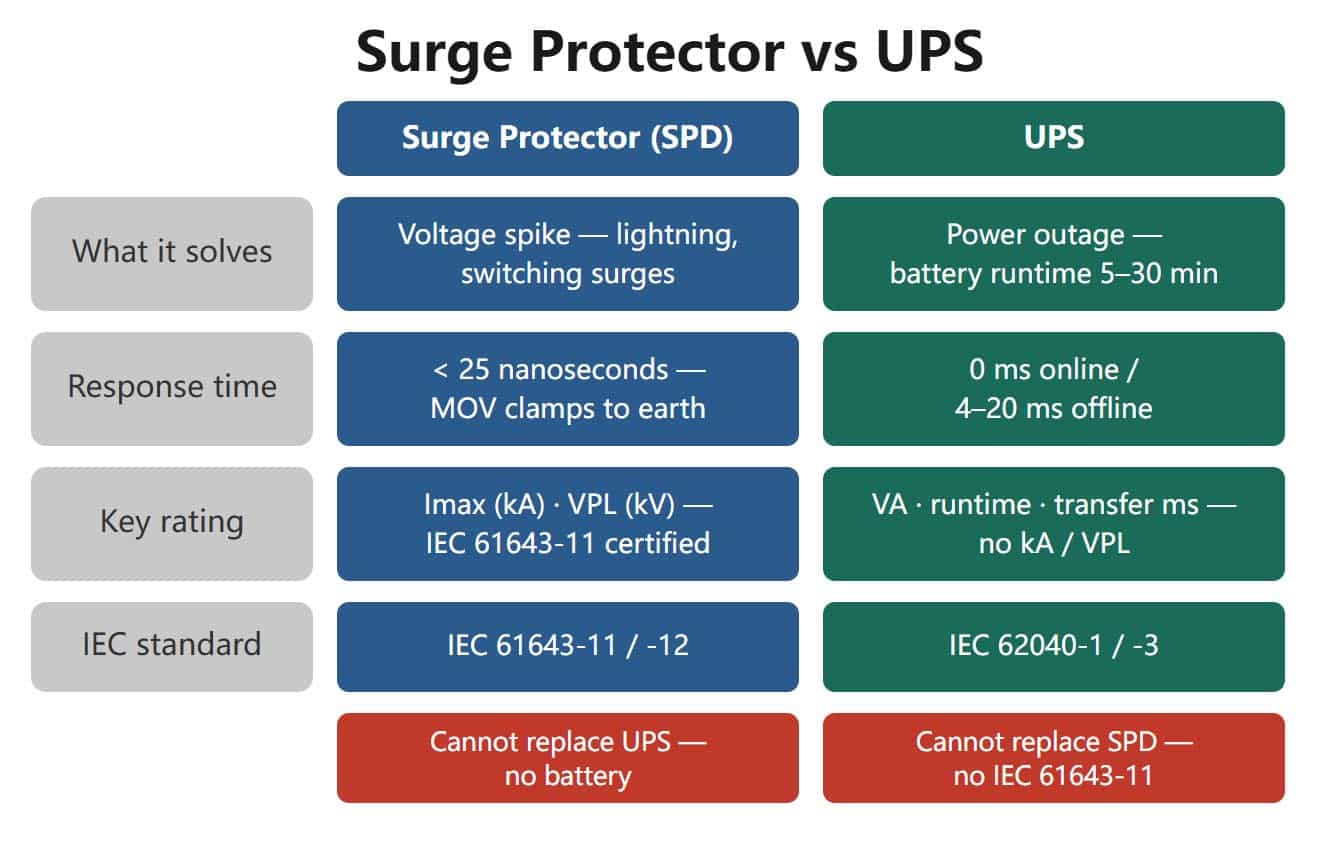
A UPS doesn’t just provide backup power. It also defends your electronics from sudden voltage changes that can quietly wear down components over time.
Built-In Surge Protection
Every UPS includes surge protection, but the quality varies. Here are the key features to look for:
- Voltage regulation: Automatically corrects low or high voltage without using the battery
- Joule rating: Measures how much surge energy the UPS can absorb
Higher joule ratings mean stronger protection
Look for at least 600–1000 joules for typical home use
How Surge Protection Works Inside a UPS
- MOVs (Metal Oxide Varistors): Absorb excess voltage from larger surges
- TVS (Transient Voltage Suppressors): React almost instantly to smaller spikes
These protective components degrade over time, so plan to replace your UPS every few years even if the battery still works.
UPS vs. Basic Surge Protector
| Feature | UPS Power Supply | Basic Surge Protector |
|---|---|---|
| Battery Backup | Yes | No |
| Runtime During Outage | Minutes to hours | None |
| Voltage Regulation | Yes | Limited or none |
| Surge Protection | Yes (rated in joules) | Yes |
| Typical Cost | $50–$500+ | $10–$50 |
Think of a UPS as a surge protector with a built-in battery. You get both power continuity and equipment protection in one box.
How Long Does a UPS Typically Last?
A UPS isn’t a buy-it-for-life device. Its useful lifespan depends on both the battery and the internal electronics.
Battery Replacement Every 2–3 Years
- Most UPS batteries are valve-regulated lead-acid (VRLA)
- They slowly lose capacity even when sitting idle
- Plan to swap the battery every 2–3 years to keep performance strong
Watch for these warning signs of a dying battery:
– Noticeably shorter runtime
– Frequent low-battery alerts
– Random beeping during normal use
Most models let you swap the battery without any tools.
Full Unit Lifespan of 3–5 Years
Even with fresh batteries, the surge protection components and inverter wear out. After 3–5 years, the risk of failure climbs. Replacing the whole unit on a 5-year cycle keeps your protection reliable.
Where a UPS Makes the Biggest Difference
A UPS isn’t only for desktop computers. Any device that needs stable power or must stay online during an outage benefits from one.
Home Office Setups
- Desktop computer and monitor: Prevent data loss and file corruption
- Router and modem: Keep your internet connection alive
- VoIP phone or webcam: Avoid dropping important calls
A 650–800VA UPS can power a full home office for 10–20 minutes, giving you time to save work and shut down properly.
Gaming and Entertainment Systems
- Gaming PC or console: Avoid losing unsaved progress
- Streaming equipment: Protect capture cards and audio gear
- Smart home hub: Keep cameras, locks, and lights online
A 1000VA or larger UPS handles high-power gaming rigs and delivers cleaner power that reduces random crashes.
Remote and Off-Grid Locations
In areas with frequent blackouts or unreliable grids, a UPS keeps critical devices running. You can pair it with a generator or solar setup for longer backup, but keep in mind that a UPS itself does not recharge from sunlight and offers limited runtime on its own.
Common UPS Mistakes to Avoid
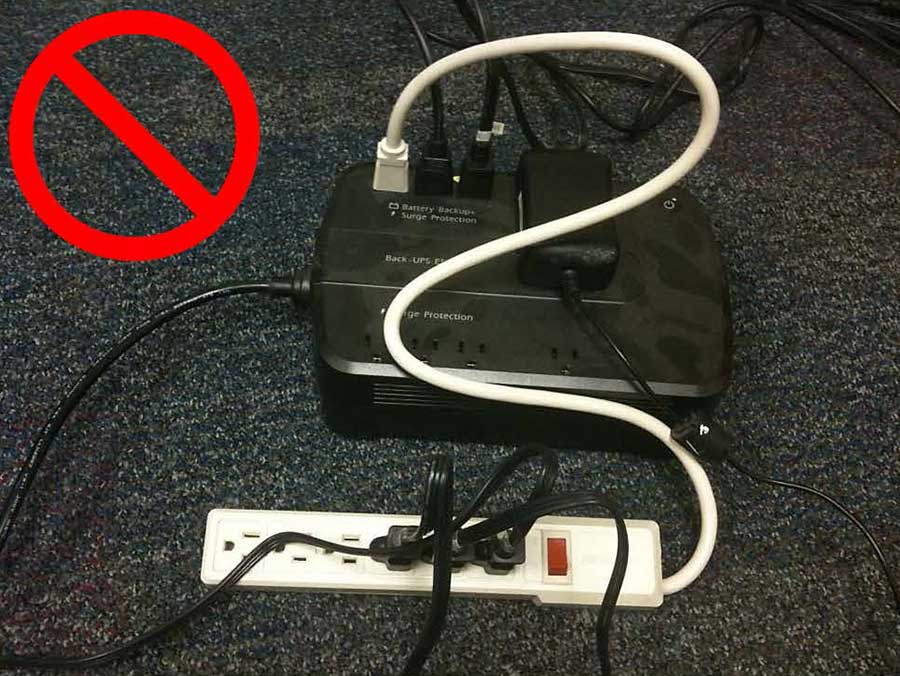
Even a great UPS won’t help if it’s used the wrong way. Steer clear of these frequent errors.
Plugging in Too Many Devices
Overloading a UPS triggers shutdowns or cuts your runtime short. Stick to essential electronics only:
- Computers
- Networking gear
- External drives
Avoid connecting these high-draw items:
– Printers
– Space heaters
– Coffee makers
– Laser printers
These can overload the UPS or distort the power it delivers.
Ignoring Power Factor
Some devices, especially older desktops, draw more VA than watts. This can quietly overload a UPS even when the wattage looks fine. Always check both ratings when sizing your UPS.
Skipping Basic Maintenance
A UPS needs occasional attention to stay reliable:
– Test the battery monthly
– Dust the vents to prevent overheating
– Update firmware on smart models
– Replace the battery every 2–3 years
Set a calendar reminder so you never get caught off guard.
When to Upgrade Your UPS
Your power needs change over time. Consider upgrading your UPS if any of these apply:
- You’ve added new devices to your setup
- Your current UPS beeps often or warns of low battery
- Runtime has dropped below 5 minutes
- You’re now protecting a server or NAS
- You need USB or network monitoring features
Modern UPS units often include:
– USB connectivity for automatic shutdown during long outages
– Network ports for remote status monitoring
– Software integration for alerts and event logs
These features are especially valuable for unattended systems like home servers.
Frequently Asked Questions About UPS Power Supplies
What does UPS stand for?
UPS stands for Uninterruptible Power Supply. It is a battery-backed device that keeps electronics running during power outages and protects them from voltage fluctuations.
How long can a UPS power a computer?
It depends on the UPS capacity and your computer’s wattage. A 1000VA UPS can power a 300W desktop PC for roughly 3–5 minutes, while a low-wattage laptop may run for 50 minutes or longer on the same UPS.
Is a UPS the same as a surge protector?
No. A surge protector only shields against voltage spikes but provides no backup power. A UPS power supply offers surge protection and battery backup, keeping devices running during blackouts.
How often should I replace a UPS battery?
Most UPS batteries should be replaced every 2 to 3 years. Even if the battery still works, its capacity drops over time, leading to shorter runtimes.
Can a UPS run a whole house?
Standard consumer UPS units are designed for individual devices or small setups, not entire homes. For whole-house backup, you’d need a much larger system or a generator. A UPS is best for protecting critical electronics like computers, networking gear, and medical devices.
Do UPS systems work with solar panels?
No. A standard UPS does not recharge from solar energy. It draws charging power from a wall outlet. You can pair a UPS with a separate solar generator for extended off-grid backup, but the UPS itself needs grid power to recharge.
Key Takeaways: Why a UPS Power Supply Belongs in Your Setup
A UPS power supply is more than just a battery in a box. It’s a complete power protection system that guards against outages, surges, and voltage swings. Whether you’re a student, remote worker, gamer, or small business owner, a UPS delivers peace of mind for a relatively small investment.
Here’s what to remember:
- A UPS provides instant battery backup during outages
- Match the VA rating to the total wattage of your devices
- Lower-wattage devices run much longer on the same UPS
- Look for a high joule rating for strong surge protection
- Replace the battery every 2–3 years and the unit every 5 years
- Only plug in essential electronics to avoid overload
Don’t wait for the next blackout to realize you needed a UPS. Pick the right size for your setup, install it today, and work with confidence knowing your power is always protected.