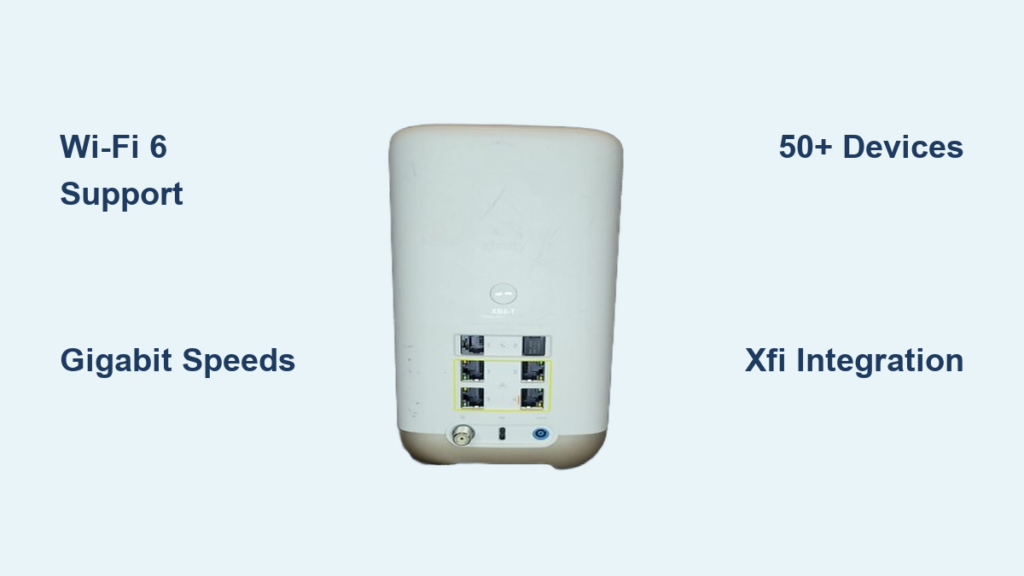
Your home internet speed and reliability depend heavily on which of the many Comcast router types you are currently using. Older models may struggle with modern streaming demands while newer gateways offer Wi-Fi 6 speeds for dozens of devices.
This guide details every major gateway model from the XB3 to the new XB8 to help you identify your equipment. You will learn the specific differences between these units and how to choose the right setup for your household needs.
Distinguishing Gateway Devices From Standalone Routers
Most Xfinity customers use a gateway device that combines a modem and router into a single unit. This all-in-one approach simplifies installation and reduces cable clutter behind your television or desk. Popular examples include the XB6 and XB7 models provided directly by Comcast.
When to Choose a Standalone Router Setup
You might prefer a standalone router if you need advanced customization or specific gaming features not found in standard gateways. This configuration requires an Xfinity-approved modem paired with a high-performance third-party router. It is often the best choice for large homes requiring complex mesh networks.
XB3 Gateway Capabilities and Limitations
The XB3 was one of the first widely deployed combo units for Xfinity customers. It utilizes DOCSIS 3.0 technology to deliver speeds up to 400 Mbps with AC1600 Wi-Fi coverage. This model works well for small apartments with basic internet usage requirements.
Why the XB3 Is Being Phased Out
- Maximum internet speed is capped by older DOCSIS 3.0 standards
- Hardware often overheats during heavy continuous use
- Limited range compared to newer dual-band models
- No support for gigabit or multi-gig internet plans
While still functional for light users, this device cannot handle the bandwidth demands of modern 4K streaming households.
XB6 Performance Upgrades for Gigabit Speeds

Comcast introduced the XB6 to support faster internet plans with DOCSIS 3.1 technology. This upgrade enables genuine gigabit speeds up to 1 Gbps for compatible service tiers. The internal hardware features improved heat management and dual-band AC2000 Wi-Fi.
Real World Benefits of the XB6 Model
- Reliable performance when multiple devices stream simultaneously
- Better thermal regulation prevents slowdowns during peak hours
- Supports 4K video streaming and online gaming without lag
- Remains a common and solid choice for most average families
This model represents a significant jump in stability over the previous XB3 generation.
XB7 Wi-Fi 5 Powerhouse Specifications

The XB7 gateway is optimized for gigabit and multi-gig plans reaching up to 2 Gbps. It features a robust AC4000-class Wi-Fi 5 radio with MU-MIMO technology. This allows the device to communicate with multiple devices simultaneously without losing speed.
Key Features of the XB7 Gateway
- Advanced beamforming directs signals specifically to your devices
- Dual-band Wi-Fi provides strong signal penetration through walls
- Fully integrated with the Xfinity xFi management platform
- Supports voice control features via Xfinity Voice Remote
Although it does not use Wi-Fi 6, the XB7 delivers exceptional performance for large homes with many connected gadgets.
XB8 Next Generation Wi-Fi 6 Technology
The XB8 is the first widely deployed Wi-Fi 6 gateway from Comcast. It supports theoretical speeds up to 6 Gbps and uses OFDMA technology for maximum efficiency. This model is designed specifically for modern smart homes packed with connected devices.
Reasons to Upgrade to the XB8
- Effortlessly handles 50 or more connected devices at once
- Target Wake Time extends battery life on smartphones and tablets
- Enhanced WPA3 security protocols protect your personal data
- Ideal for 8K streaming and low-latency competitive gaming
This unit is currently the top-tier gateway available to Xfinity subscribers.
xFi Advanced Gateway Management Features
All modern XB6, XB7, and XB8 models belong to the xFi Advanced Gateway program. These devices integrate seamlessly with the Xfinity mobile app for total network control. You can monitor data usage and manage connected devices from anywhere.
Cloud Based Network Control Options
- Set strict parental controls and content filters easily
- Pause internet access for specific devices instantly
- Create secure guest networks for visitors
- View real-time speed tests and outage notifications
You do not need to access complex backend settings since the app handles all management tasks.
Compatible Modems for Bring Your Own Device
You can bypass rental fees by using a DOCSIS 3.1 modem with your own router. This Bring Your Own Device approach requires an approved modem list to ensure compatibility with the Xfinity network.
Top Approved Modem Examples
- Netgear CM2000: Supports DOCSIS 3.1 with speeds up to 2 Gbps
- Motorola MB8600: Features 6-stream capability for up to 6 Gbps
- Arris SB8200: A reliable choice for standard gigabit plans
Pair these modems with high-performance routers from brands like Asus or TP-Link for optimal results.
How to Identify Your Specific Router Model

Your specific router model number is printed on a sticker located on the back or bottom of the unit. Look for specific labels like NM15AC for XB3 or XB8-A for the newest generation. Identifying this number is the first step in troubleshooting connection issues.
Using the Xfinity App for Identification
- Open the xFi app on your mobile device
- Navigate to the Connect tab
- Select your gateway from the device list
- View the model number and firmware version displayed
This method ensures you have the exact hardware details without needing to physically inspect the device.
Rent Versus Buy Cost Analysis
Xfinity charges between $14 and $18 monthly to rent a gateway device. Over a five-year period, these rental fees total $840 to $1,080 which exceeds the retail cost of buying equipment. Purchasing your own gear eliminates this recurring expense entirely.
Long Term Savings Calculation
- Retail price for an XB8 gateway is approximately $400 to $500
- Equipment pays for itself within 24 to 36 months
- Buying provides full control over firmware and settings
- Ownership prevents future rate increases on rental fees
Buying is significantly cheaper in the long run and offers better hardware options.
Troubleshooting Slow Speeds on XB Devices
Outdated firmware is a common cause of performance drops on XB gateways. The Xfinity app usually updates these automatically but you can check manually. Regular reboots also clear memory leaks that slow down your network.
Steps to Reboot Your Router
- Unplug the power cord from the back of the unit
- Wait at least 30 seconds for the capacitors to discharge
- Plug the power cord back into the outlet
- Wait 2 to 3 minutes for a full system restart
Perform this maintenance monthly or whenever you notice significant speed degradation.
Fixing Wi-Fi Dropouts and Dead Zones
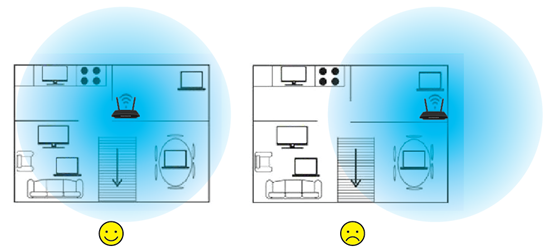
Poor placement often causes Wi-Fi dropouts and weak signal areas in your home. You should place your router in a central location elevated off the floor. Keep the device away from microwaves and thick concrete walls that block signals.
Using Mesh Extenders for Coverage
- Pair your XB7 or XB8 with xFi Pods for seamless coverage
- Third-party mesh systems like Google Nest Wifi work well too
- Extenders eliminate dead zones in large or multi-story homes
- Ensure all nodes are within reasonable range of the main gateway
This setup creates a unified network name so devices switch automatically as you move.
Upgrade Recommendations by User Profile
Light users with only one or two devices can stick with an XB6 or a basic DOCSIS 3.1 modem. Families with multiple streamers and gamers should upgrade to an XB7 or XB8 for stability. Smart homes with over 50 devices require the latest Wi-Fi 6 technology.
Best Hardware for Heavy Usage
- Choose XB8 for maximum device capacity and speed
- Pair a Motorola MB8600 modem with a Wi-Fi 6 router
- Consider high-end mesh systems like Asus ZenWiFi Pro
- Ensure your plan matches the capability of your hardware
Matching your equipment to your usage habits prevents unnecessary bottlenecks.
Future Trends in Comcast Router Technology
Comcast is expected to roll out Wi-Fi 7 gateways between 2025 and 2026. These new units will support speeds exceeding 10 Gbps with reduced latency. Multi-link operation will allow devices to use multiple bands simultaneously.
Expanding Support for Personal Equipment
- Xfinity continues to expand its list of approved modems
- More customers are adopting BYOD to avoid rental fees
- Future firmware will likely enhance third-party router integration
- Industry standards are shifting toward higher security protocols
Staying informed about these changes helps you plan future network upgrades effectively.
Frequently Asked Questions About Comcast Router Types
What is the difference between XB6 and XB7 routers?
The XB6 supports speeds up to 1 Gbps with AC2000 Wi-Fi while the XB7 handles multi-gig plans up to 2 Gbps. The XB7 also features stronger beamforming and better handling of multiple devices.
Can I use my own router with Xfinity internet?
Yes, you can use your own router by connecting it to an approved DOCSIS 3.1 modem. This allows you to avoid monthly rental fees and use advanced features not available on standard gateways.
How do I know which Comcast router type I have?
Check the label on the bottom of your device for model numbers like XB6, XB7, or XB8. You can also open the Xfinity app and view your equipment details under the Connect tab.
Is the XB8 router worth the upgrade cost?
The XB8 is worth it if you have over 20 devices or need Wi-Fi 6 speeds for gaming and 4K streaming. It offers significantly better efficiency and lower latency than older Wi-Fi 5 models.
How often should I reboot my Xfinity gateway?
You should reboot your gateway once a month or whenever you experience slow speeds. A simple power cycle clears temporary memory issues and refreshes your connection to the network.
Key Takeaways for Selecting Comcast Router Types
Choosing the right equipment from the available Comcast router types directly impacts your daily internet experience. Newer models like the XB8 offer superior speed and device capacity while older units may limit your potential bandwidth.
Evaluate your household needs and consider purchasing your own hardware to save money over time. Check your current model today and upgrade if your current setup cannot handle your digital lifestyle.