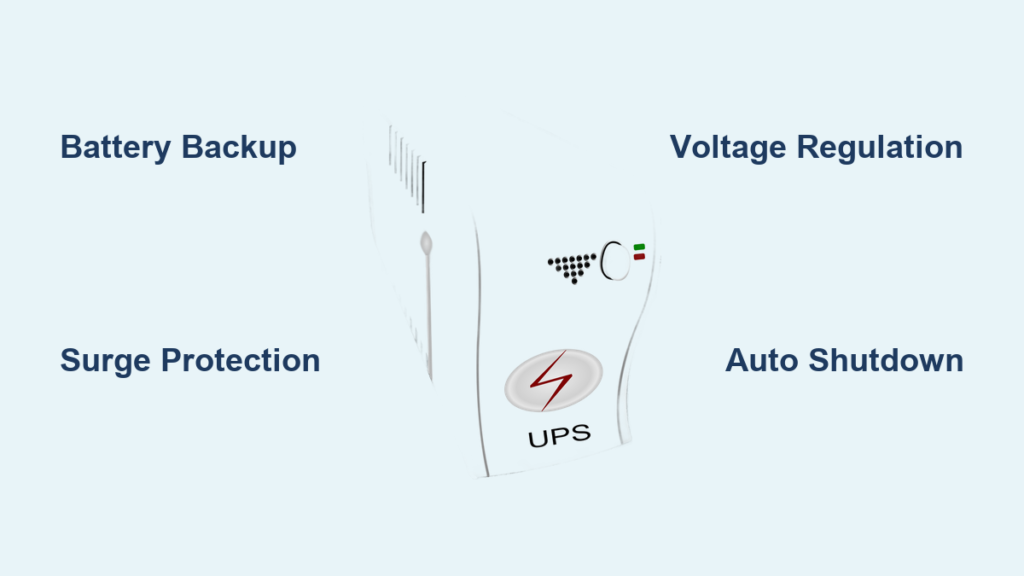
When the lights flicker and your computer suddenly shuts down, you risk losing unsaved work, corrupting files, and even damaging hardware. This is exactly the problem a computer UPS (Uninterruptible Power Supply) is built to solve. A UPS is an electrical device that delivers emergency power to your equipment the moment utility power fails, bridging the gap between an outage and a safe shutdown or generator startup.
Unlike a basic surge protector, a UPS contains a built-in battery that takes over almost instantly when power drops. Most models supply 5 to 15 minutes of backup power, enough to save your work, close programs, and shut down safely. Beyond battery backup, a quality UPS also conditions incoming power, filtering surges, voltage dips, and electrical noise that can slowly wear down sensitive electronics.
This guide breaks down everything you need to know about computer UPS systems. You’ll learn how they work, the main types available, the problems they solve, and how to pick the right one for your setup, whether you protect a single home PC or an entire server room.
Types of Computer UPS Systems
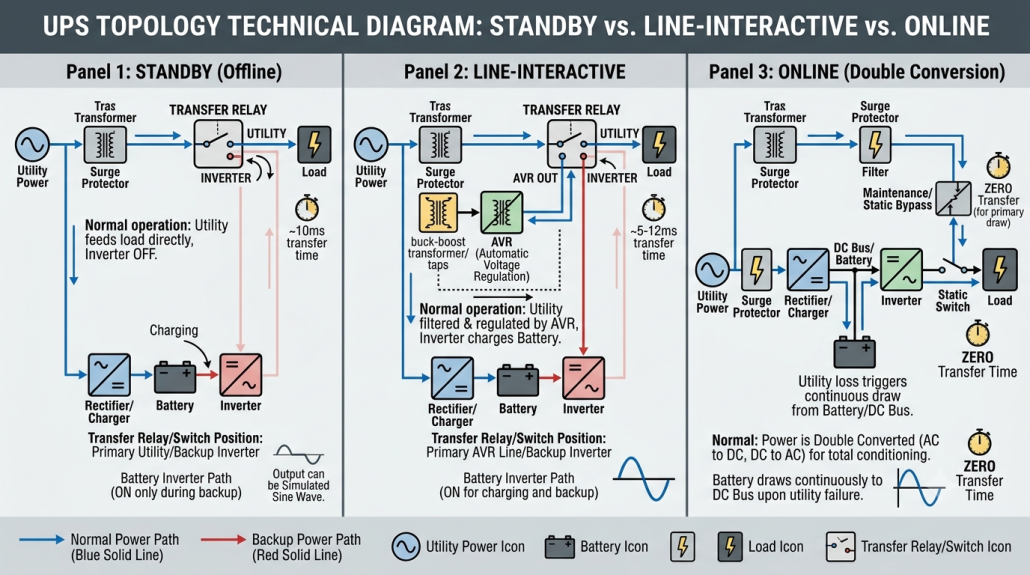
Not every UPS works the same way. The three main designs offer different levels of protection, efficiency, and cost. Your choice depends on how sensitive your equipment is and how stable your local power is.
Standby (Offline) UPS
This is the simplest and most affordable UPS design, commonly used for home computers, printers, and Wi-Fi routers.
Under normal conditions, your devices run directly on wall power. The UPS only switches to its internal battery when it detects a power failure, voltage sag, or surge. The transfer typically happens within 4 milliseconds, fast enough for most PCs thanks to their built-in ride-through capability.
Standby UPS units offer basic surge protection and battery backup, but they don’t continuously regulate voltage or filter electrical noise. They’re a solid fit for environments with stable power and infrequent outages.
Line-Interactive UPS
A step up from standby designs, the line-interactive UPS adds automatic voltage regulation (AVR) through a multi-tap autotransformer. This feature corrects minor voltage fluctuations without draining the battery.
When the input voltage drops too low, the UPS boosts it back up. When it spikes too high, the UPS reduces it. The battery only kicks in during severe sags, swells, or full outages, which extends battery life and improves efficiency.
Line-interactive UPS systems are popular for small offices and home workstations, especially in areas with frequent brownouts or older wiring. They offer better protection than standby models without the higher cost of online systems.
Online (Double Conversion) UPS
The online UPS is the gold standard for mission-critical applications like servers, medical equipment, and industrial systems.
Instead of passing utility power straight through, an online UPS converts incoming AC power to DC, then back to clean AC through an inverter, a process called double conversion. Your equipment always runs on this regenerated power, even when utility power is perfectly normal.
Because there’s no switching moment, an online UPS delivers zero transfer time during outages. It also provides complete isolation from electrical noise, harmonics, frequency variations, and voltage sags. The trade-off is higher cost, more heat output, and slightly lower efficiency, but for environments where downtime is not an option, it’s the only reliable choice.
Common Power Problems a UPS Solves

A computer UPS does more than keep your PC running during blackouts. It also protects against several other power issues that can damage hardware or corrupt data.
Voltage Sags and Brownouts
A voltage sag is a brief drop in power, while a brownout is a longer period of under-voltage. Either can cause computers to reboot, freeze, or fail to start properly. Line-interactive and online UPS models fix this through AVR or continuous double conversion.
Power Surges and Spikes
Sudden voltage spikes, often caused by lightning strikes or grid switching, can fry circuits instantly. All UPS types include surge suppression, but only online models filter high-frequency noise on a continuous basis.
Complete Power Outages
When the grid goes down, a UPS provides immediate battery power. Typical runtime ranges from 5 to 15 minutes, enough to save files and shut down safely. Larger UPS units or models paired with generators can run much longer.
Electrical Noise and Harmonics
High-frequency interference and distorted waveforms come from nearby motors, elevators, fluorescent lights, or poor wiring. These issues are only fully resolved by online UPS systems with double conversion.
Frequency Instability
In some regions or generator-backed setups, the AC frequency may drift from the standard 50/60 Hz. Online UPS units regulate frequency automatically, ensuring stable output regardless of input quality.
How to Choose the Right UPS for Your Computer

Picking the right UPS means matching protection to your actual needs, not just buying the biggest battery you can afford.
Determine Your Power Load (VA Rating)
Every UPS has a volt-ampere (VA) rating that indicates how much equipment it can support. As a general guideline:
- A small desktop PC needs around 300–600 VA
- A gaming PC with monitor needs roughly 800–1200 VA
- Servers and workstations usually require 1500 VA or more
Add up the wattage of all connected devices, multiply by 1.6 to estimate the minimum VA, and leave a 20–30% safety margin for inrush currents and future expansion.
Decide on Runtime Needs
Ask yourself how long you need the UPS to keep your equipment running. A short runtime of 5–10 minutes is usually enough to save work and shut down. Longer runtimes of 30 minutes or more require larger batteries or external battery packs, which are more common in server rooms and remote installations.
Match UPS Type to Power Quality
Your local power quality should guide your choice. Use this quick comparison:
| Power Environment | Recommended UPS Type |
|---|---|
| Stable grid, rare outages | Standby or line-interactive |
| Frequent brownouts or surges | Line-interactive |
| Noisy power or critical systems | Online (double conversion) |
Some manufacturers use a simple classification system. For example, Eaton’s 3-5-9 series naming indicates protection level: 3 Series for standby, 5 Series for line-interactive, and 9 Series for online with full protection.
Key Features to Look For
Beyond type and size, modern UPS units offer smart features that make protection easier and more effective.
Pure Sine Wave Output
Cheaper UPS models output simulated sine waves, which can cause problems with laser printers, AC motors, and some sensitive power supplies. Pure sine wave output is compatible with all devices and prevents overheating or strange behavior.
Communication and Auto-Shutdown
Most UPS units connect to your computer via USB or Ethernet to enable automatic shutdown during extended outages. Software like APC’s PowerChute or Eaton’s IPP monitors battery status and triggers a safe shutdown when needed. Network-enabled UPS units can also send alerts through SNMP or even SMS through GSM modules.
Form Factor: Tower vs. Rack-Mount
Tower UPS units stand upright and fit nicely under a desk, making them ideal for homes and small offices. Rack-mount UPS units fit into standard 19-inch server racks and range from 1U to 12U in size, perfect for data centers. Many rack models include rotatable displays for easy viewing in either orientation.
Battery Types and Lifespan
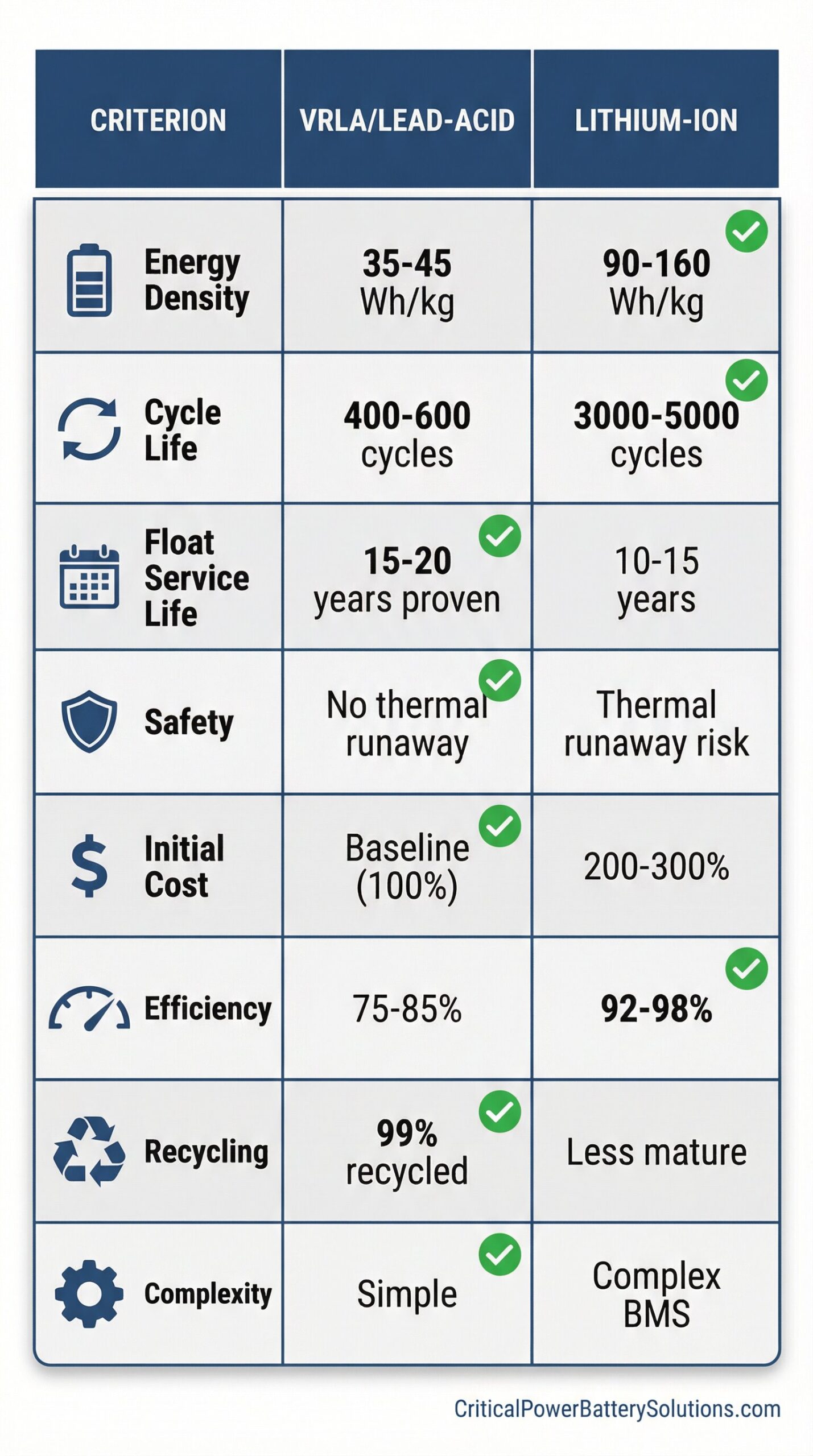
The battery is the heart of any UPS. Knowing the difference between battery types helps you plan for maintenance and replacement.
VRLA (Valve-Regulated Lead-Acid)
This is the most common battery type in consumer and small business UPS units. It’s sealed, maintenance-free, and affordable, but it produces a lifespan of 3–5 years and is sensitive to heat.
Lithium-Ion, Especially LFP
Lithium-ion batteries, particularly lithium iron phosphate (LFP), are becoming more popular, especially in data centers. They last 7–10 years, recharge faster, and pack more energy into a smaller space. They’re more expensive upfront but often offer a lower total cost of ownership over time.
Battery Testing and Maintenance
Most UPS units run automatic self-tests, but these last only a few seconds and may miss weak batteries. A deeper rundown test every 6 to 12 months gives a much more accurate picture of battery health. Just keep in mind that deep discharge testing can slowly damage lead-acid batteries through sulfation, so don’t overdo it.
For large battery banks, individual cell monitoring lets you detect failing units without shutting down the entire system.
When You Need an Online UPS
Most home users do just fine with a line-interactive model, but certain situations demand the full protection of double conversion.
Critical Applications
Servers, medical imaging equipment, and industrial automation systems cannot tolerate even a brief interruption. A 4 ms gap is enough to crash a virtual machine, corrupt a database, or halt a manufacturing line. Online UPS systems eliminate this risk entirely.
Poor Power Quality Environments
If your area suffers from frequent voltage fluctuations, unstable generator power, or high electrical noise, an online UPS acts as an electrical firewall between your equipment and the dirty grid.
Real-World Proof
In a demonstration where utility power was cut for 2 seconds, only the online UPS kept a connected light burning steady. Standby and line-interactive units both flickered during the switch, clear evidence of their brief transfer delay.
Redundancy and Reliability
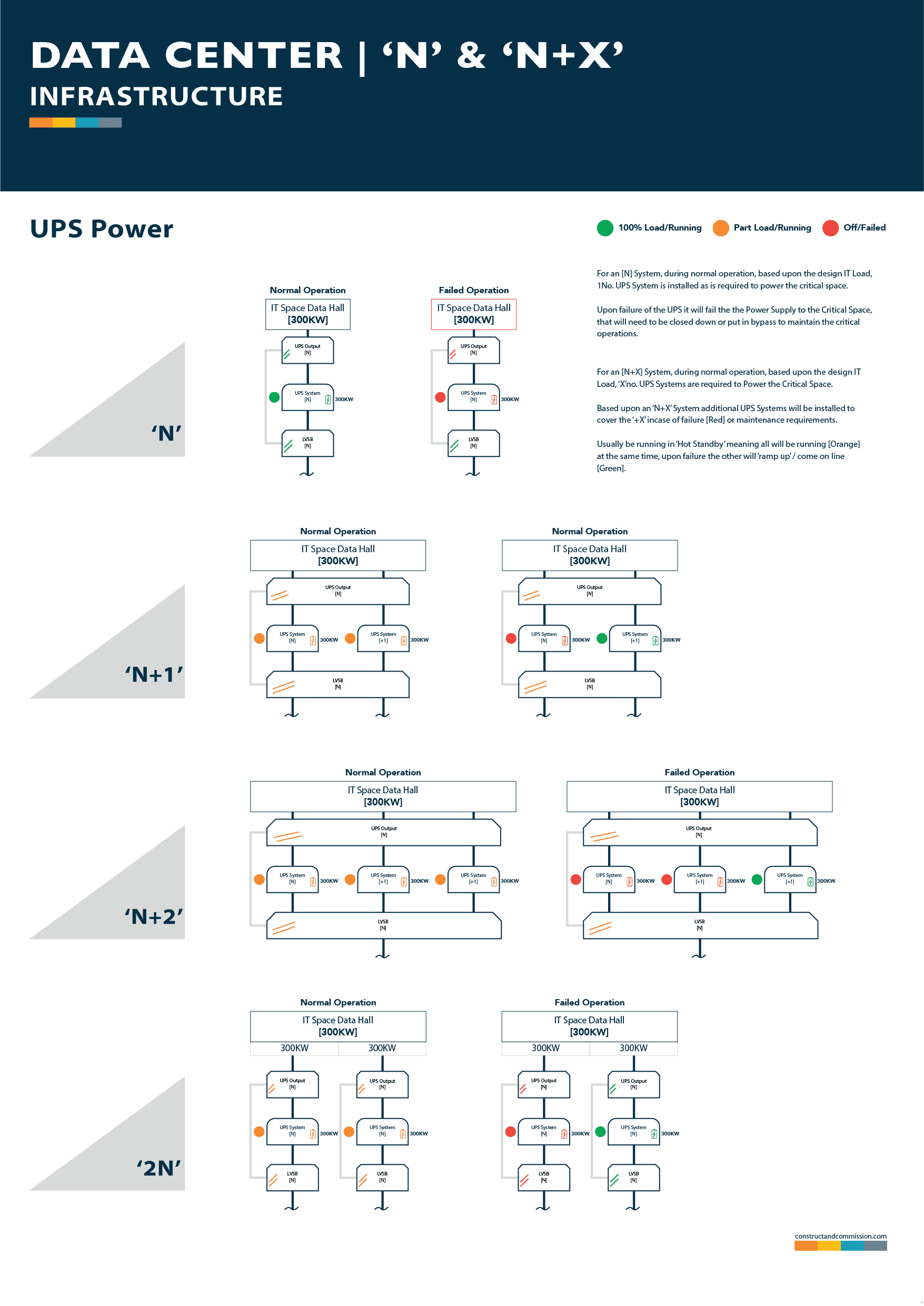
For maximum uptime, many businesses rely on redundant UPS configurations.
N + 1 Configuration
Instead of one large UPS, use multiple smaller units so that if one fails, the others pick up the load. For example, if your load needs 2 modules to run, adding a third gives you N + 1 redundancy with a built-in safety margin.
1 + 1 (2N) Server Redundancy
Many servers have dual power supplies. Plugging each into a separate UPS unit protects against both power supply failure and UPS failure at the same time. If budget is tight, plugging one supply into the wall and the other into a UPS still offers some protection.
Avoiding Common UPS Mistakes
Even the best UPS can fail if it’s misused. Here are a few pitfalls to watch out for.
Mixing Old and New Batteries
Never mix old and new batteries in the same string. Older batteries discharge faster and can be over-discharged by newer ones, while new batteries may never fully charge because of premature voltage cutoff. The result is reduced capacity and a shorter lifespan for both. Always replace entire battery strings at once.
Ignoring Parallel String Risks
In series-parallel battery setups, a shorted cell in one string can drain the others or cause reverse charging. The safest approach is to avoid parallel strings altogether and use separate inverters for each series string.
Overlooking THD and Generator Compatibility
Double-conversion UPS units draw non-sinusoidal current, which creates harmonic distortion. This can destabilize generators, sometimes requiring them to be twice as large as the UPS. Choosing a UPS with an IGBT rectifier keeps total harmonic distortion below 2% and avoids the need to oversize your generator.
Frequently Asked Questions About Computer UPS Systems
How long can a computer UPS power my PC during an outage?
Most UPS units provide 5 to 15 minutes of backup power. That’s enough time to save your work and shut down safely. Larger units or models with extended battery packs can run longer.
Do I need a UPS if I already have a surge protector?
Yes. A surge protector only guards against voltage spikes. A UPS adds battery backup and often voltage regulation, which a surge protector cannot do.
What’s the difference between a standby and an online UPS?
A standby UPS passes utility power straight through until an outage occurs, then switches to battery in about 4 milliseconds. An online UPS continuously converts power through its inverter, delivering zero transfer time and cleaner output overall.
Can a UPS protect my gaming PC?
Absolutely. A line-interactive or online UPS with at least 800–1200 VA is ideal for a gaming PC and monitor, protecting against outages, surges, and voltage fluctuations.
How often should I replace UPS batteries?
VRLA batteries typically last 3–5 years. Lithium-ion batteries can last 7–10 years. Replace batteries proactively before they fail to avoid unexpected downtime.
Will a UPS save energy?
Most UPS units are quite efficient, but online models use a bit more power because they continuously run the inverter. A line-interactive UPS is usually the most energy-efficient choice for home and office use.
Final Takeaways on Choosing a Computer UPS
A computer UPS is more than just a battery in a box. It’s a power conditioner, surge protector, and safety net rolled into one device that keeps your work, data, and hardware safe from the unpredictable nature of the electrical grid.
Start by assessing your power load, runtime needs, and local power quality. Choose a standby or line-interactive UPS for basic home or office use, and step up to an online UPS for critical systems, noisy power environments, or anywhere downtime simply isn’t an option.
Once your UPS is installed, don’t forget basic maintenance. Test it monthly, replace batteries on schedule, and keep the load under 80% of capacity. A little attention now means your UPS will be ready the moment the power goes out, and you’ll never lose work to a flicker again.